<p><!-- [if gte mso 9]><xml>  <w:WordDocument>   <w:View>Normal</w:View>   <w:Zoom>0</w:Zoom>   <w:TrackMoves/>   <w:TrackFormatting/>   <w:PunctuationKerning/>   <w:ValidateAgainstSchemas/>   <w:SaveIfXMLInvalid>false</w:SaveIfXMLInvalid>   <w:IgnoreMixedContent>false</w:IgnoreMixedContent>   <w:AlwaysShowPlaceholderText>false</w:AlwaysShowPlaceholderText>   <w:DoNotPromoteQF/>   <w:LidThemeOther>EN-US</w:LidThemeOther>   <w:LidThemeAsian>X-NONE</w:LidThemeAsian>   <w:LidThemeComplexScript>X-NONE</w:LidThemeComplexScript>   <w:Compatibility>    <w:BreakWrappedTables/>    <w:SnapToGridInCell/>    <w:WrapTextWithPunct/>    <w:UseAsianBreakRules/>    <w:DontGrowAutofit/>    <w:SplitPgBreakAndParaMark/>    <w:DontVertAlignCellWithSp/>    <w:DontBreakConstrainedForcedTables/>    <w:DontVertAlignInTxbx/>    <w:Word11KerningPairs/>    <w:CachedColBalance/>    <w:UseFELayout/>   </w:Compatibility>   <m:mathPr>    <m:mathFont m:val="Cambria Math"/>    <m:brkBin m:val="before"/>    <m:brkBinSub m:val="--"/>    <m:smallFrac m:val="off"/>    <m:dispDef/>    <m:lMargin m:val="0"/>    <m:rMargin m:val="0"/>    <m:defJc m:val="centerGroup"/>    <m:wrapIndent m:val="1440"/>    <m:intLim m:val="subSup"/>    <m:naryLim m:val="undOvr"/>   </m:mathPr></w:WordDocument> </xml><![endif]--></p>
<p class="MsoNormal" style="line-height: normal;"><img loading="lazy" decoding="async" src="https://blog.atlanticinkjet.com/wp-content/uploads/2013/09/samsung-clt-506l-2.jpg" alt="Samsung CLT – 506L" width="250" height="240" align="left" border="1" hspace="3" vspace="3" /></p>
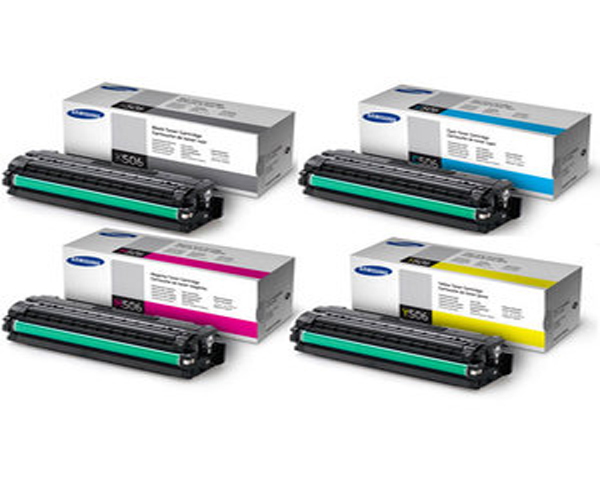
<p class="MsoNormal" style="line-height: normal;"><span style="font-size: 10pt; font-family: 'Verdana','sans-serif'; color: black;">If you have a <a title="Samsung CLT-506L" href="https://atlanticinkjet.com/" target="_blank" rel="noopener">Samsung CLT – 506L</a> and never want to your printer to stop giving prints, you need to make sure that its toner cartridge never runs out of ink. There are several ways following which you can stay connected to your printer, let us have a look –</span></p></m></w></w></w></w></w></w></w></w></w></w>{"id":1067,"date":"2013-09-27T08:05:51","date_gmt":"2013-09-27T13:05:51","guid":{"rendered":"https:\/\/blog.atlanticinkjet.com\/choose-by-brand\/samsung\/options-available-for-samsung-clt-%e2%80%93-506l.html"},"modified":"2017-11-23T06:37:06","modified_gmt":"2017-11-23T11:37:06","slug":"options-available-for-samsung-clt-506l","status":"publish","type":"post","link":"https:\/\/blog.atlanticinkjet.com\/choose-by-brand\/samsung\/options-available-for-samsung-clt-506l.html","title":{"rendered":"Options Available for Samsung CLT &#8211; 506L"},"content":{"rendered":"<p><!-- [if gte mso 9]><xml>  <w:WordDocument>   <w:View>Normal<\/w:View>   <w:Zoom>0<\/w:Zoom>   <w:TrackMoves\/>   <w:TrackFormatting\/>   <w:PunctuationKerning\/>   <w:ValidateAgainstSchemas\/>   <w:SaveIfXMLInvalid>false<\/w:SaveIfXMLInvalid>   <w:IgnoreMixedContent>false<\/w:IgnoreMixedContent>   <w:AlwaysShowPlaceholderText>false<\/w:AlwaysShowPlaceholderText>   <w:DoNotPromoteQF\/>   <w:LidThemeOther>EN-US<\/w:LidThemeOther>   <w:LidThemeAsian>X-NONE<\/w:LidThemeAsian>   <w:LidThemeComplexScript>X-NONE<\/w:LidThemeComplexScript>   <w:Compatibility>    <w:BreakWrappedTables\/>    <w:SnapToGridInCell\/>    <w:WrapTextWithPunct\/>    <w:UseAsianBreakRules\/>    <w:DontGrowAutofit\/>    <w:SplitPgBreakAndParaMark\/>    <w:DontVertAlignCellWithSp\/>    <w:DontBreakConstrainedForcedTables\/>    <w:DontVertAlignInTxbx\/>    <w:Word11KerningPairs\/>    <w:CachedColBalance\/>    <w:UseFELayout\/>   <\/w:Compatibility>   <m:mathPr>    <m:mathFont m:val=\"Cambria Math\"\/>    <m:brkBin m:val=\"before\"\/>    <m:brkBinSub m:val=\"--\"\/>    <m:smallFrac m:val=\"off\"\/>    <m:dispDef\/>    <m:lMargin m:val=\"0\"\/>    <m:rMargin m:val=\"0\"\/>    <m:defJc m:val=\"centerGroup\"\/>    <m:wrapIndent m:val=\"1440\"\/>    <m:intLim m:val=\"subSup\"\/>    <m:naryLim m:val=\"undOvr\"\/>   <\/m:mathPr><\/w:WordDocument> <\/xml><![endif]--><\/p>\n<p class=\"MsoNormal\" style=\"line-height: normal;\"><img loading=\"lazy\" decoding=\"async\" src=\"https:\/\/blog.atlanticinkjet.com\/wp-content\/uploads\/2013\/09\/samsung-clt-506l-2.jpg\" alt=\"Samsung CLT \u2013 506L\" width=\"250\" height=\"240\" align=\"left\" border=\"1\" hspace=\"3\" vspace=\"3\" \/><\/p>\n<p class=\"MsoNormal\" style=\"line-height: normal;\"><span style=\"font-size: 10pt; font-family: 'Verdana','sans-serif'; color: black;\">If you have a <a title=\"Samsung CLT-506L\" href=\"https:\/\/atlanticinkjet.com\/\" target=\"_blank\" rel=\"noopener\">Samsung CLT \u2013 506L<\/a> and never want to your printer to stop giving prints, you need to make sure that its toner cartridge never runs out of ink. There are several ways following which you can stay connected to your printer, let us have a look \u2013<\/span><\/p><\/m><\/w><\/w><\/w><\/w><\/w><\/w><\/w><\/w><\/w><\/w>","protected":false},"excerpt":{"rendered":null,"protected":false},"author":61,"featured_media":0,"comment_status":"open","ping_status":"open","sticky":false,"template":"","format":"standard","meta":{"footnotes":""},"categories":[55],"tags":[],"class_list":["post-1067","post","type-post","status-publish","format-standard","hentry","category-samsung"],"_links":{"self":[{"href":"https:\/\/blog.atlanticinkjet.com\/wp-json\/wp\/v2\/posts\/1067","targetHints":{"allow":["GET"]}}],"collection":[{"href":"https:\/\/blog.atlanticinkjet.com\/wp-json\/wp\/v2\/posts"}],"about":[{"href":"https:\/\/blog.atlanticinkjet.com\/wp-json\/wp\/v2\/types\/post"}],"author":[{"embeddable":true,"href":"https:\/\/blog.atlanticinkjet.com\/wp-json\/wp\/v2\/users\/61"}],"replies":[{"embeddable":true,"href":"https:\/\/blog.atlanticinkjet.com\/wp-json\/wp\/v2\/comments?post=1067"}],"version-history":[{"count":0,"href":"https:\/\/blog.atlanticinkjet.com\/wp-json\/wp\/v2\/posts\/1067\/revisions"}],"wp:attachment":[{"href":"https:\/\/blog.atlanticinkjet.com\/wp-json\/wp\/v2\/media?parent=1067"}],"wp:term":[{"taxonomy":"category","embeddable":true,"href":"https:\/\/blog.atlanticinkjet.com\/wp-json\/wp\/v2\/categories?post=1067"},{"taxonomy":"post_tag","embeddable":true,"href":"https:\/\/blog.atlanticinkjet.com\/wp-json\/wp\/v2\/tags?post=1067"}],"curies":[{"name":"wp","href":"https:\/\/api.w.org\/{rel}","templated":true}]}}