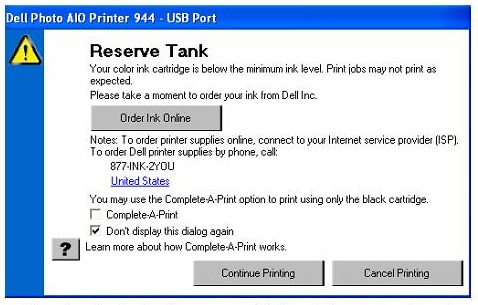
 You may encounter a low ink message when trying to print. DO NOT be alarmed. This is very common because you are using a remanufactured or recycled inkjet cartridges. The ink gauge on your printer will no longer read the ink levels correctly because it does not recognize your cartridge as “new”. There is no way to reset this gauge, but this message can be bypassed easily when necessary and will not affect your printing performance. Keep in mind that the ink gauges on printers only serve as an ESTIMATE of how much ink may be remaining in the cartridge.
{"id":1251,"date":"2014-10-21T04:49:06","date_gmt":"2014-10-21T09:49:06","guid":{"rendered":"https:\/\/blog.atlanticinkjet.com\/general-cartridges-posts\/dell-inkjet-cartridgeslow-ink-or-out-of-ink-message.html"},"modified":"2017-11-23T05:10:44","modified_gmt":"2017-11-23T10:10:44","slug":"dell-inkjet-cartridgeslow-ink-or-out-of-ink-message","status":"publish","type":"post","link":"https:\/\/blog.atlanticinkjet.com\/general-cartridges-posts\/dell-inkjet-cartridgeslow-ink-or-out-of-ink-message.html","title":{"rendered":"Dell Inkjet Cartridges:Low Ink or out of ink message"},"content":{"rendered":" You may encounter a low ink message when trying to print. \u00a0DO NOT be alarmed. \u00a0This is very common because you are using a remanufactured or\u00a0recycled inkjet cartridges<\/a>. \u00a0The ink gauge on your printer will no longer read the ink levels correctly because it does not recognize your cartridge as \u201cnew\u201d. \u00a0There is no way to reset this gauge, but this message can be bypassed easily when necessary and will not affect your printing performance. \u00a0Keep in mind that the ink gauges on printers only serve as an ESTIMATE of how much ink may be remaining in the cartridge.<\/p>","protected":false},"excerpt":{"rendered":null,"protected":false},"author":61,"featured_media":0,"comment_status":"open","ping_status":"open","sticky":false,"template":"","format":"standard","meta":{"footnotes":""},"categories":[18,1],"tags":[107,88],"class_list":["post-1251","post","type-post","status-publish","format-standard","hentry","category-dell-printer-cartridges","category-general-cartridges-posts","tag-dell-inkjet-cartridges","tag-remanufactured-cartridges"],"_links":{"self":[{"href":"https:\/\/blog.atlanticinkjet.com\/wp-json\/wp\/v2\/posts\/1251","targetHints":{"allow":["GET"]}}],"collection":[{"href":"https:\/\/blog.atlanticinkjet.com\/wp-json\/wp\/v2\/posts"}],"about":[{"href":"https:\/\/blog.atlanticinkjet.com\/wp-json\/wp\/v2\/types\/post"}],"author":[{"embeddable":true,"href":"https:\/\/blog.atlanticinkjet.com\/wp-json\/wp\/v2\/users\/61"}],"replies":[{"embeddable":true,"href":"https:\/\/blog.atlanticinkjet.com\/wp-json\/wp\/v2\/comments?post=1251"}],"version-history":[{"count":0,"href":"https:\/\/blog.atlanticinkjet.com\/wp-json\/wp\/v2\/posts\/1251\/revisions"}],"wp:attachment":[{"href":"https:\/\/blog.atlanticinkjet.com\/wp-json\/wp\/v2\/media?parent=1251"}],"wp:term":[{"taxonomy":"category","embeddable":true,"href":"https:\/\/blog.atlanticinkjet.com\/wp-json\/wp\/v2\/categories?post=1251"},{"taxonomy":"post_tag","embeddable":true,"href":"https:\/\/blog.atlanticinkjet.com\/wp-json\/wp\/v2\/tags?post=1251"}],"curies":[{"name":"wp","href":"https:\/\/api.w.org\/{rel}","templated":true}]}}